 CONNECTED BUSINESS. CLEAR CONTROL.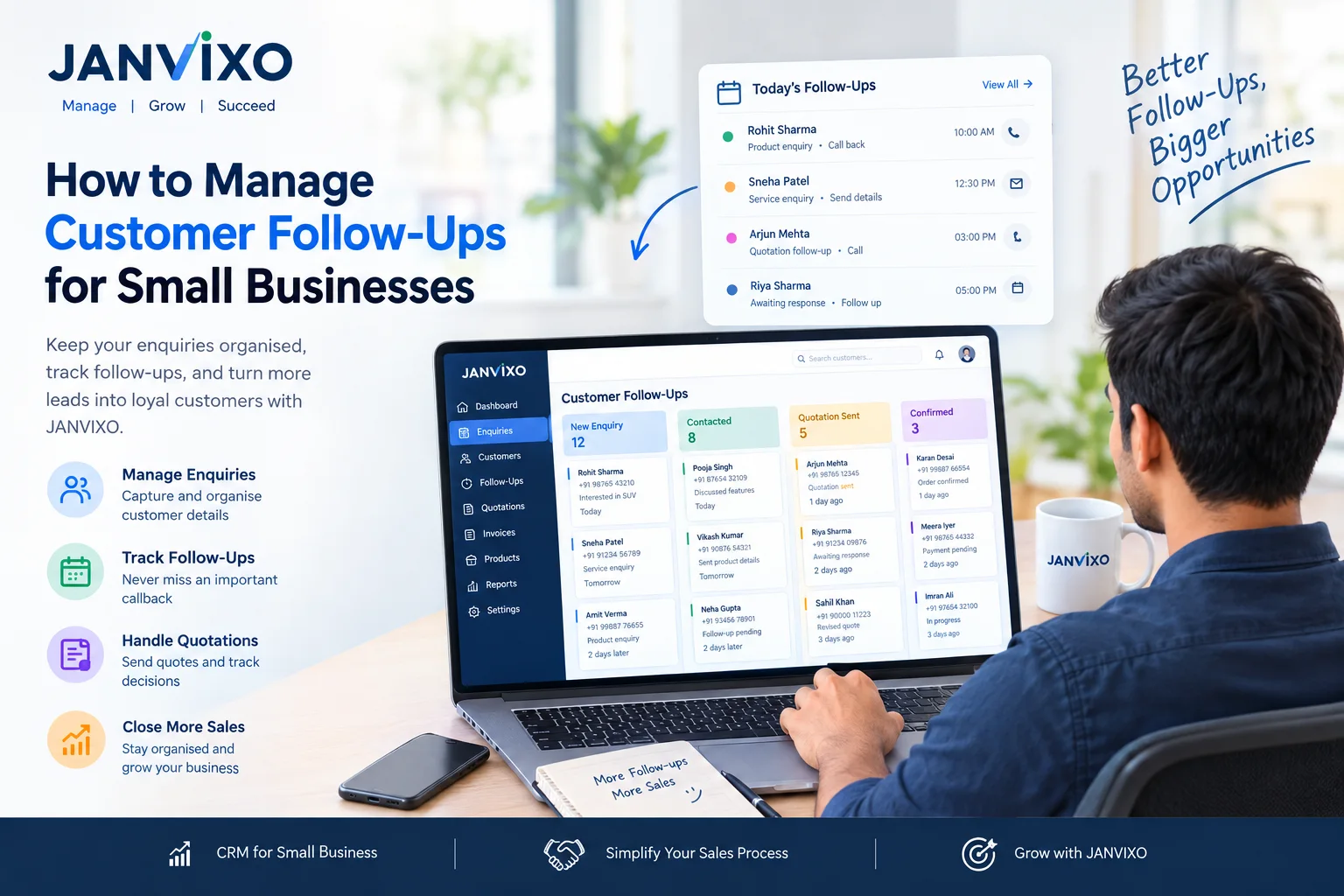
How to Manage Customer Follow-Ups for Small Businesses
Every business wants more customers, but getting an enquiry is only the first step. What happens after the enquiry often determines whether a potential customer moves forward, requests a quotation or chooses another business.
For many small businesses, customer follow-ups are still managed through phone calls, WhatsApp chats, diaries and spreadsheets. This approach may work when there are only a few customers, but it becomes difficult to manage as enquiries increase.
A missed call, forgotten reminder or delayed quotation can leave a potential sale unattended.
A structured customer follow-up management process helps businesses organise enquiries, record customer conversations and identify the next action required for every lead.
With JANVIXO, businesses can organise customer enquiries, follow-up dates, remarks, quotations and related business activities through a connected workflow, according to their configured features.
In this guide, we explain how small businesses can improve their customer follow-up process and how CRM software can help organise everyday sales activities.
What Is Customer Follow-Up Management?
Customer follow-up management is the process of keeping track of potential and existing customers after an initial interaction.
It includes recording enquiries, remembering previous conversations, scheduling the next contact and updating the status of each lead.
For example, a customer may contact a vehicle dealer to ask about a particular model. The dealer provides the details, but the customer needs a few days to decide.
If the dealer records the conversation and schedules a follow-up, the sales team has a clear next step instead of relying on memory.
An organised follow-up process helps businesses:
Keep customer enquiries organised.
Identify leads that need attention.
Record previous conversations.
Track quotations and sales opportunities.
Coordinate activities between team members.
Maintain a clearer view of pending customer actions.
Why Do Small Businesses Miss Customer Follow-Ups?
Many small businesses do not have a dedicated sales operations team. The owner may handle enquiries, quotations, customer calls, payments and daily operations.
When information is spread across different tools, several problems can occur.
1. Customer Information Is Scattered
Customer details may be saved in phone contacts, WhatsApp conversations, paper registers or Excel files.
Finding the latest information takes time, especially when several employees communicate with the same customer.
2. Follow-Up Dates Are Forgotten
A customer may ask for a callback next week or request a quotation before making a decision.
Without a reliable tracking process, these commitments can be forgotten.
3. Sales Teams Lack Visibility
Business owners may not know which enquiries are new, which customers have received quotations and which leads still need attention.
4. Previous Conversations Are Difficult to Find
When a customer calls again, the employee may not remember the earlier discussion, product requirement or agreed next step.
5. Pending Activities Accumulate
Enquiries, payment collections, service callbacks and renewal reminders can compete for the same person's attention.
A structured system helps bring these activities into a more organised workflow.
How to Build an Effective Customer Follow-Up Process
An effective follow-up process does not have to be complicated. Small businesses can begin with a few consistent steps.
Step 1: Record Every Important Enquiry
Whenever a potential customer contacts the business, record the relevant information.
Depending on the business, this may include:
Customer name and contact details.
Product or service requirement.
Enquiry source.
Date of enquiry.
Assigned team member.
Next follow-up date.
JANVIXO's enquiry and customer management workflows can help keep relevant customer information together rather than relying entirely on separate records.
Step 2: Assign a Lead Status
Every enquiry should have a clear status so that the team can understand what has happened and what needs to happen next.
A simple lead workflow could include:
New Enquiry
Contacted
Requirement Understood
Quotation Sent
Follow-Up Required
Confirmed
Completed
Lost or Cancelled
Businesses can adapt these stages to their actual sales process.
For example, an insurance agent may need policy-related stages, while a service workshop may need a separate process for service requests and job cards.
Step 3: Set the Next Follow-Up Date
A lead record should make the next action clear.
If a customer asks for a callback after three days, record the agreed date and a short note explaining the reason for the follow-up.
JANVIXO can be used to record follow-up dates and remarks within the relevant customer workflow.
This makes it easier for team members to review today's activities, overdue follow-ups and upcoming actions.
Step 4: Record Customer Conversations
A useful customer record should provide enough context for the next conversation.
Instead of writing only “Call customer,” record a meaningful remark such as:
“Customer is comparing two product options and requested a quotation before Friday.”
The next team member can then continue the conversation with a clearer understanding of the customer's requirement.
Step 5: Track Quotations and Decisions
Sending a quotation does not necessarily mean that a sale is complete.
Customers may need clarification, revised pricing or additional time to make a decision.
Keep the quotation status and next action organised so the team can identify which customers need further assistance.
Step 6: Review Pending Follow-Ups Daily
At the beginning or end of each working day, review:
New enquiries that need a response.
Follow-ups scheduled for today.
Overdue customer callbacks.
Quotations awaiting a decision.
Pending payment collection activities.
Service callbacks and upcoming renewals, where relevant.
A short daily review helps the team prioritise work and reduces dependence on memory.
What Is CRM Software for Small Businesses?
CRM stands for Customer Relationship Management. CRM software helps businesses organise customer details, interactions, enquiries and sales activities.
For small businesses, a CRM system can provide a central place to maintain customer records and understand the status of each enquiry.
Instead of keeping separate lists for leads, customer conversations and follow-up dates, a connected CRM workflow can make related information easier to find.
Useful CRM capabilities may include:
Customer profile management.
Lead status tracking.
Follow-up dates and remarks.
Customer interaction history.
Quotation tracking.
Team assignments and permissions.
Reports or activity summaries, depending on the software.
The most useful CRM system is one that fits the business's actual workflow and is easy for the team to update consistently.
How JANVIXO Helps Organise Customer Follow-Ups
JANVIXO is business management software designed to help local and growing businesses organise customer enquiries and related business activities.
Its configured workflows can bring together customer information, enquiry stages, follow-up dates and remarks.
Manage Enquiries in One Workflow
Keep relevant customer enquiry information organised so that the team can review lead status and identify the next required action.
Maintain Customer History
Record relevant customer details and activities so employees can refer to earlier conversations when following up.
Organise Quotations and Payments
Connect follow-up activities with quotation and invoice records where those workflows are available and configured.
Support Different Business Types
A vehicle dealer, insurance agent, distributor and service workshop may need different lead stages. A workflow-based approach allows businesses to organise activities around their operational needs.
Connect Online Enquiries With Business Activities
JANVIXO Digital Showroom can provide an online way to present products or services and receive enquiries. Where configured, these enquiries can be connected to the business's customer management workflow.
Explore the available capabilities on the JANVIXO Features page.
Customer Follow-Up Example: A Local Dealer
Consider a local dealer who receives an enquiry from a customer interested in a product.
The process could work as follows:
Day 1: Record the enquiry, understand the customer's requirement and share relevant product information.
Day 2: Prepare and send a quotation if requested.
Day 4: Review the follow-up date and contact the customer to answer questions.
Day 6: Update the lead status based on the customer's decision.
After confirmation: Continue with the relevant order, invoice and payment workflow.
This is an illustrative example, not a guaranteed sales timeline. The actual schedule should depend on the customer's needs and the type of business.
The important principle is to record each meaningful interaction and identify the next action instead of leaving the entire process to memory.
Best Practices for Better Customer Follow-Ups
Contact Customers at an Appropriate Time
Follow the timeline agreed with the customer. Avoid unnecessary or excessive messages.
Keep Follow-Up Notes Short and Useful
Record the requirement, last discussion and next action. Avoid notes that do not help the next interaction.
Prioritise High-Intent Enquiries
Customers who have requested a quotation, scheduled a visit or asked for specific product details may need timely attention.
Give Every Lead a Clear Owner
When multiple employees handle enquiries, assign responsibility so everyone knows who should take the next action.
Keep Customer Data Accurate
Update contact information, enquiry status and follow-up dates when circumstances change.
Review Results Regularly
Where relevant reports are available, review enquiry response, lead progression and completed sales to understand which parts of the process need improvement.
Which Businesses Can Benefit From Follow-Up Management?
Customer follow-up management can be useful across many industries.
Vehicle dealerships: Track model enquiries, quotation discussions and visit requests.
Insurance agents: Organise prospective customers and policy renewal follow-ups.
Service businesses: Track customer callbacks, service requests and future maintenance activities.
Building-material dealers: Manage product enquiries, quotations and pending customer decisions.
Distributors and wholesalers: Organise buyer enquiries, repeat orders and outstanding business activities.
Repair workshops: Keep customer communication connected with service work and job records.
The specific workflow should reflect how each business operates.
Frequently Asked Questions
What is customer follow-up management?
Customer follow-up management is the process of recording customer interactions, scheduling the next contact and tracking the status of enquiries or sales opportunities.
Why is CRM software useful for small businesses?
CRM software helps small businesses organise customer information, track leads, maintain interaction history and manage sales activities in a more structured way.
How can I avoid missing customer follow-ups?
Record important enquiries, assign responsibility, set the next follow-up date and review pending activities regularly. A suitable CRM system can help organise this process.
Can JANVIXO manage customer enquiries?
JANVIXO provides enquiry and customer management workflows that can help businesses organise lead details, stages and follow-up activities according to their configuration.
Is customer follow-up management useful for service businesses?
Yes. Service businesses can use an organised follow-up process for customer callbacks, service requests, quotations and future service activities.
Where can I learn more about JANVIXO?
Visit the JANVIXO Features page to review available capabilities, compare options on the Pricing page, or visit the Registration page to explore getting started.
Conclusion
Customer follow-up management is an important part of running a small business. Recording enquiries, maintaining customer history, setting follow-up dates and reviewing pending activities can help teams organise their daily work more effectively.
A suitable CRM workflow makes it easier to understand which customers need attention and what action should happen next.
JANVIXO brings enquiry management, customer records, follow-up activities and related business workflows into a connected business management platform, according to the features available in the configured workspace.
If your business still depends on scattered chats, diaries and spreadsheets, start by reviewing your current process and identifying where a more organised workflow could help.
Explore JANVIXO Features, review Pricing Plans, or get started with JANVIXO.